How can we help?
Step-by-step help with signing in, your courses, certificates, team licences and refunds.
Signing in and your account
How do I sign in?
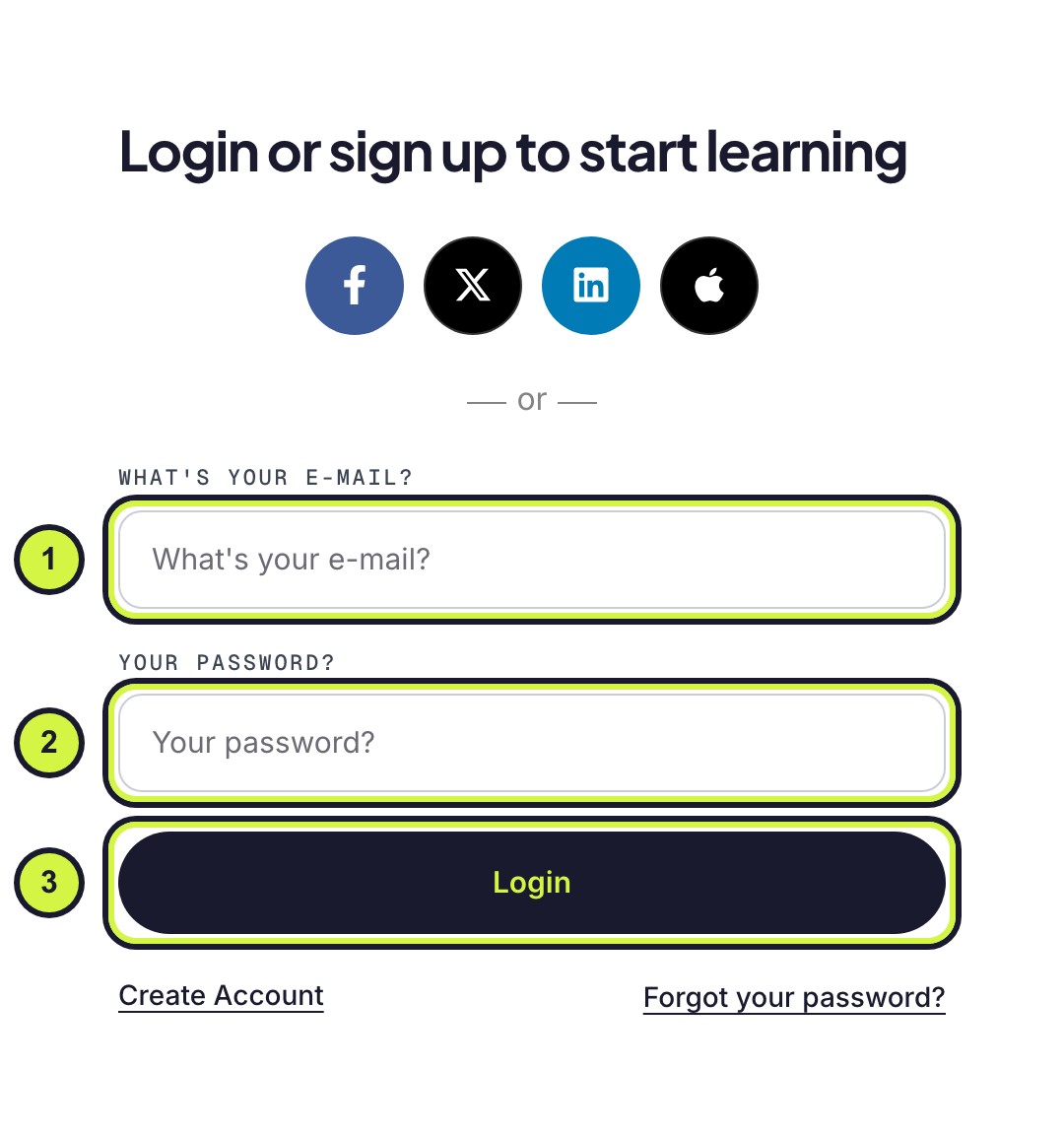
- Go to Sign in.
- Type the email address you signed up with.
- Type your password and press Login.
Your dashboard opens. If you signed up with Facebook, X, LinkedIn or Apple, press the same button again instead.
I forgot my password
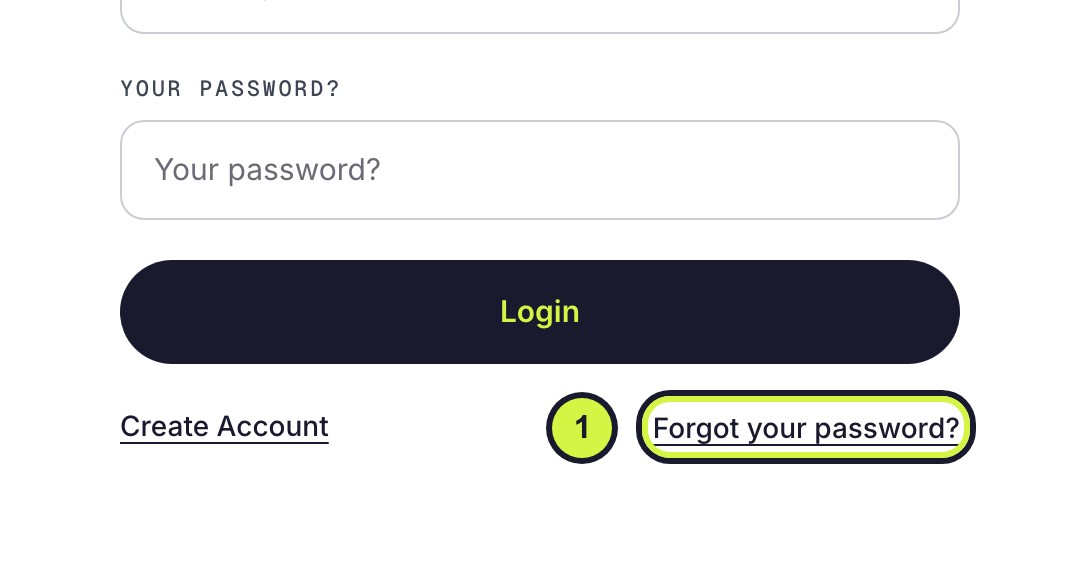
- On the Sign in page, press Forgot your password?
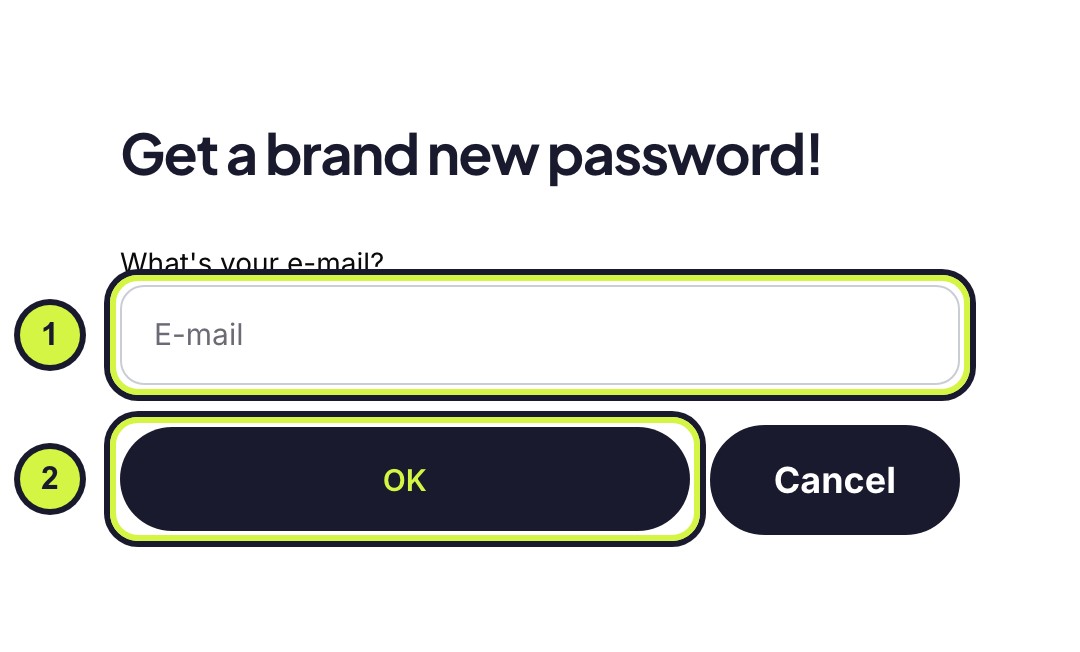
- Type the email address on your account and press OK.
- Open the email from Interic and press Choose a new password.
- Choose your new password, then sign in with it.
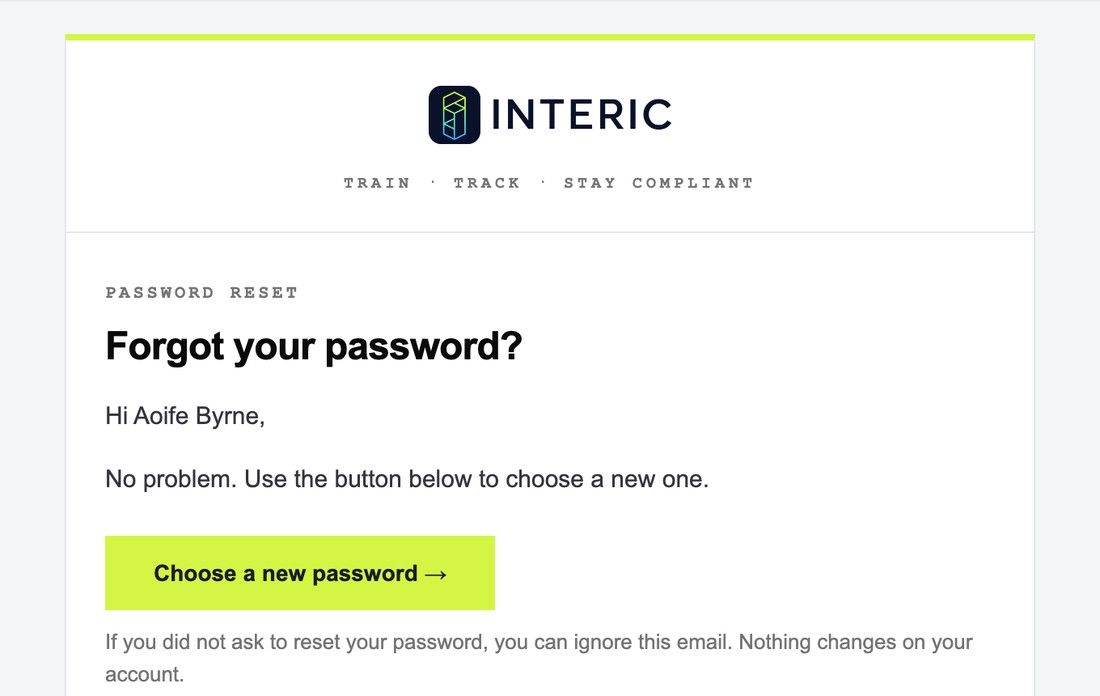
If you did not ask for a reset, ignore the email. Nothing changes on your account.
I did not get the password or sign-up email
- Wait a few minutes, then check your junk or spam folder.
- Make sure you typed the email address you signed up with. A reset email only goes to an address that has an account.
- Try again from Sign in.
Still nothing? Email info@interic.ie from the address on your account and we will help.
How do I create an account?
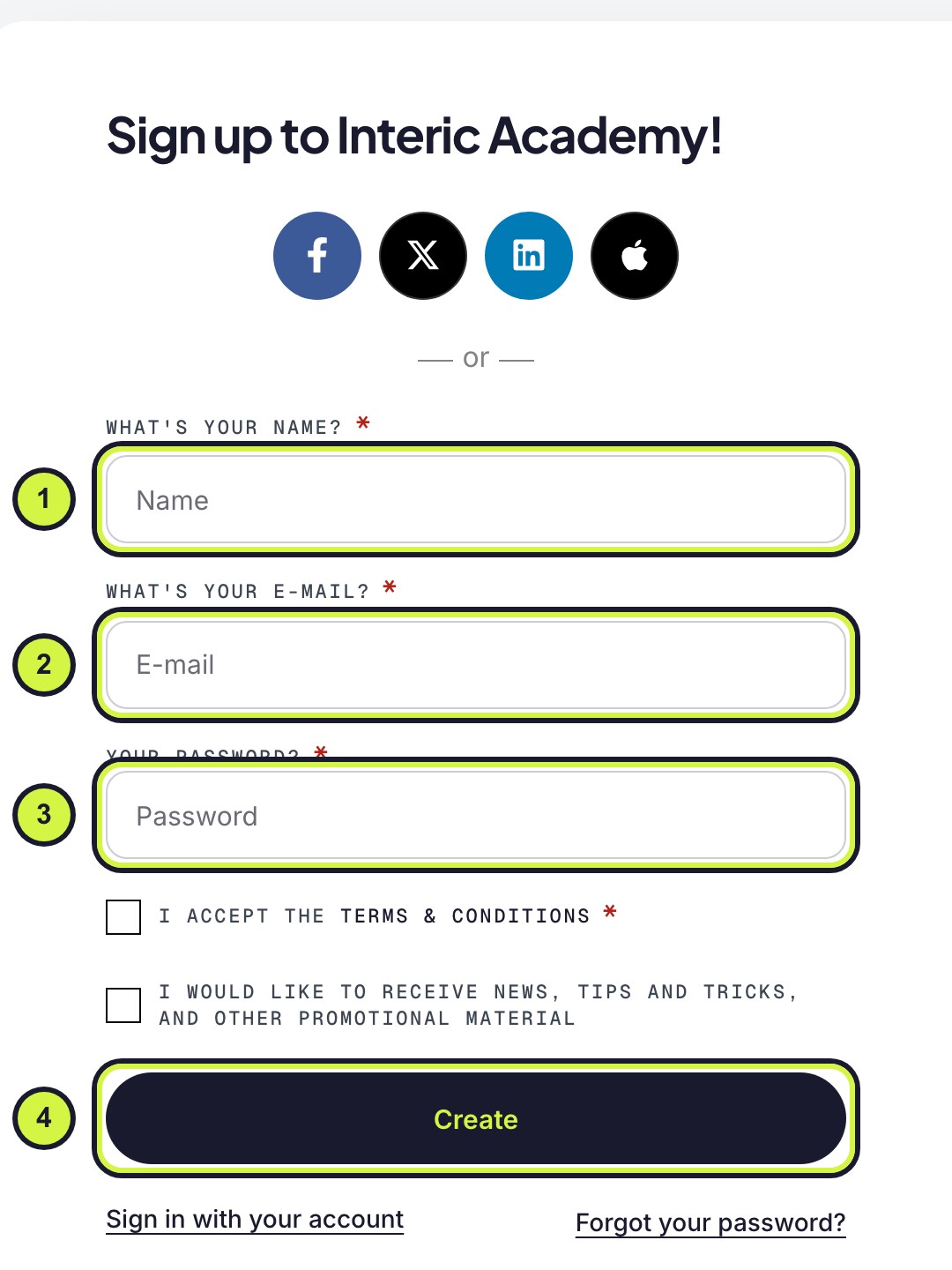
- On the Sign in page, press Create Account.
- Type your name as you want it on your certificates, your email address and a password.
- Tick I accept the Terms & Conditions and press Create.
Were you sent a course by your employer? Create the account with the email address the invite was sent to, or the course cannot be claimed.
How do I change my name, email or password?
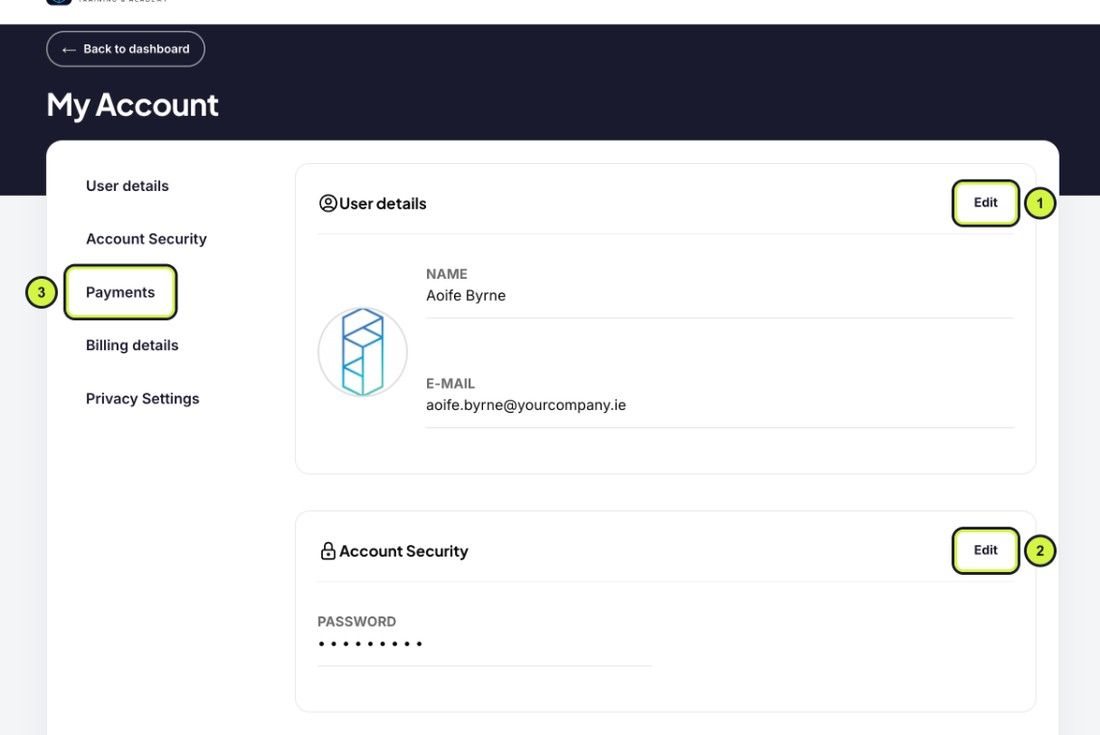
- Open My account (bottom of the dashboard menu).
- Press Edit beside User details to change your name or email address.
- Press Edit beside Account Security to change your password.
- Your receipts are under Payments.
Your certificates use the name on your account, so check it before you finish a course.
Your courses and the course player
Finding your way around the dashboard
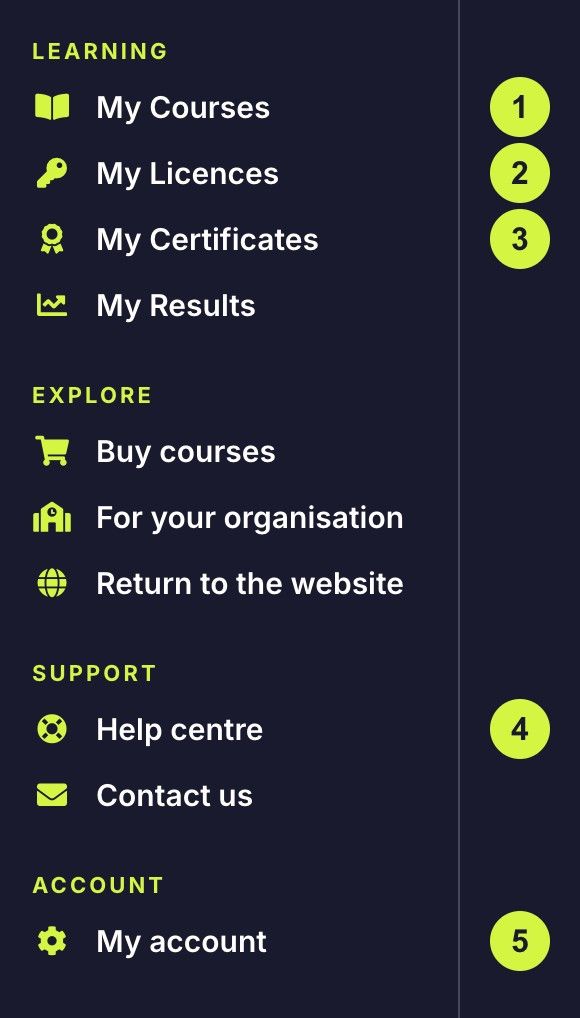
- My Courses: every course you are enrolled on, with your progress.
- My Licences: courses you bought for other people, and who you sent them to.
- My Certificates: download your certificates.
- Help centre: this page.
- My account: your name, email, password and receipts.
How do I start or continue a course?
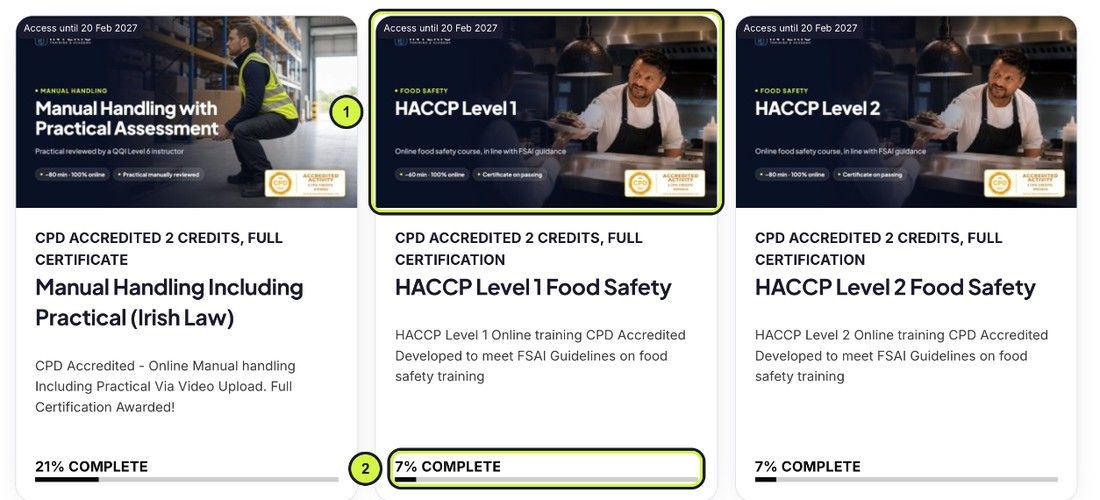
- Open My Courses on your dashboard.
- Press the course picture. It opens where you left off.
- The bar under each course shows how much you have done.
The date at the top of each card shows how long you have access to the course.
How to use the course player
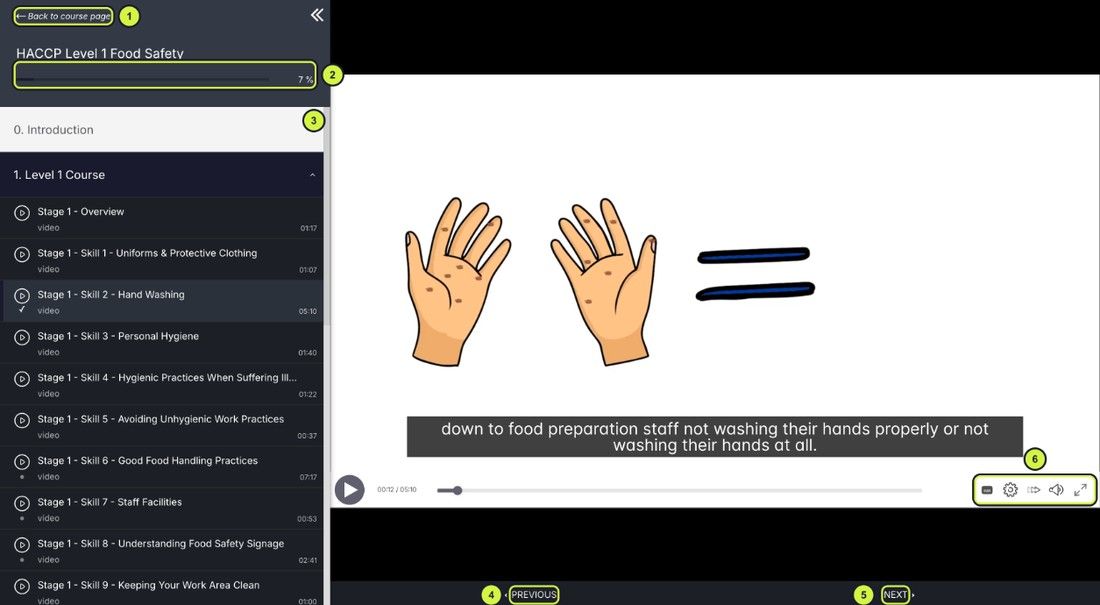
- Back to course page takes you out of the player.
- The bar shows how much of the course you have completed.
- The lesson list: press any lesson to open it. A tick shows the ones you have done.
- Previous goes back one lesson.
- Next moves on to the next lesson.
- Video controls: captions, playback settings, volume and full screen.
Your progress saves as you go, so you can stop at any time and pick up where you left off.
Which devices can I use?
Any up-to-date web browser on a computer, tablet or phone. Sign in on any device and your progress follows you.
Certificates
Where do I get my certificate?
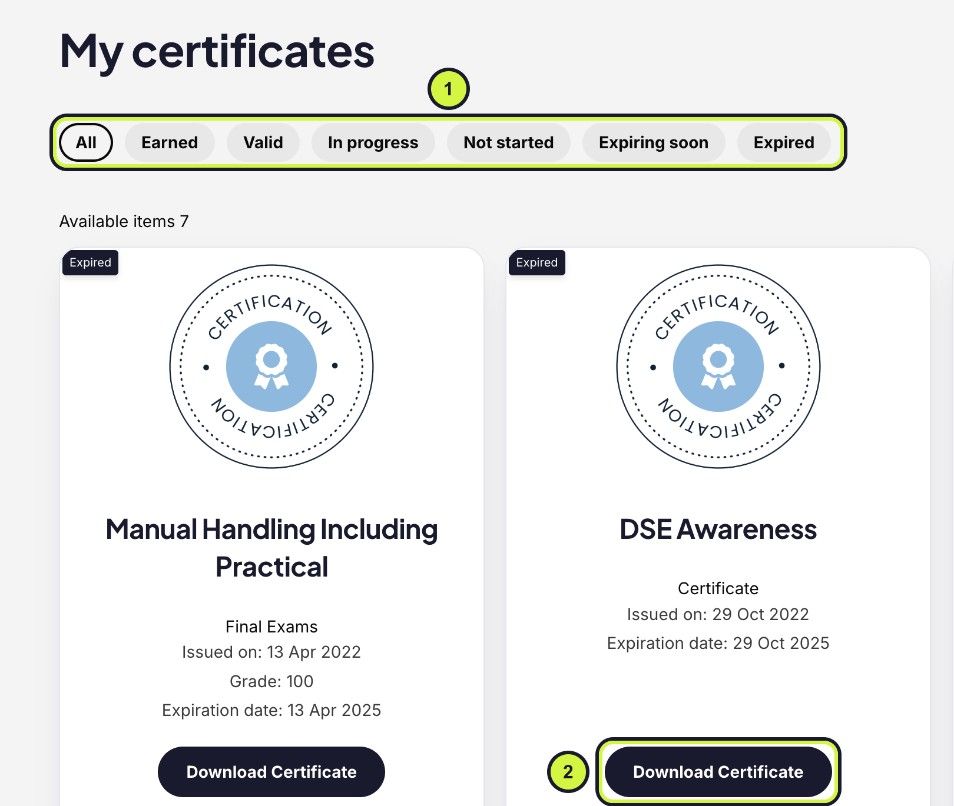
- When you pass the final assessment, open My Certificates on your dashboard.
- Use the buttons along the top to filter, for example Valid or Expiring soon.
- Press Download Certificate to save or print it.
On courses with a practical assessment, such as Manual Handling, the certificate appears once the instructor has graded your video.
How do I check (verify) a certificate?
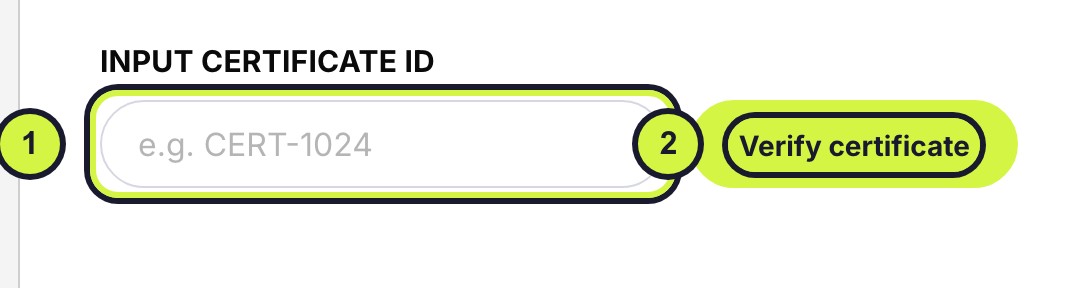
- Go to Verify a certificate. You do not need an account.
- Type the certificate ID exactly as it is printed on the certificate.
- Press Verify certificate. The learner, course, issue date, expiry date and status appear.
If it does not verify, check the ID was typed exactly. If it still does not verify, email a copy of the certificate to info@interic.ie with the subject line Certificate check and we will check it against our records.
My name is wrong on my certificate
- Correct your name in My account (see changing your details).
- Email info@interic.ie with the course name and the correct spelling, and we will help.
How long is my certificate valid?
Interic certificates are valid for 3 years. We email you before it expires and again when it does. To renew, take the course again: a new purchase starts a new course, exam and certificate.
Claiming a course you were sent
I was sent a course: how do I claim it?
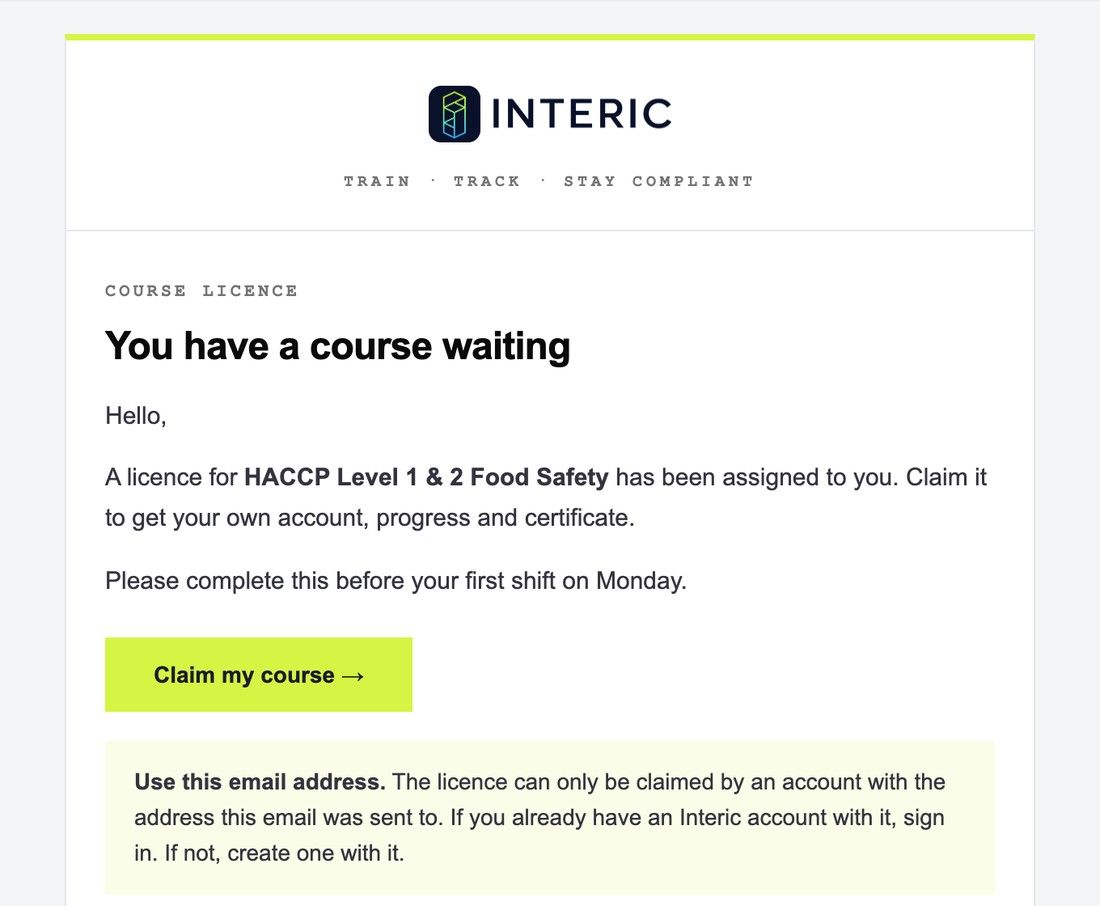
- Open the email You have a course waiting and press Claim my course.
- Already have an Interic account with that email address? Sign in. If not, create an account with that same address.
- The course is added to My Courses and your dashboard opens.
Use the email address the invite was sent to. A course can only be claimed by the account with that address.
It says the licence was assigned to a different account
You are signed in with a different email address from the one the course was sent to.
- Sign out (bottom of the dashboard menu).
- Open the invite email again and press Claim my course.
- Sign in, or create an account, with the email address the invite was sent to.
Need the course on a different address? Ask the person who sent it to revoke it and send it to the right one.
I claimed the course but cannot see it
- Check you are signed in with the email address the invite was sent to.
- Open My Courses on your dashboard and refresh the page.
- Ask the person who sent it to check My Licences. Your address should show as USED.
Still missing? Email info@interic.ie with the course name and your email address.
I cannot find my invite, or the link does not work
- Search your inbox, junk and spam for You have a course waiting.
- Ask the person who sent it to press Resend in their My Licences.
- If they revoked it, the old link stops working. They can send you a new one.
Buying and assigning licences for your team
How do I buy courses for my team?
- Open the course from All courses.
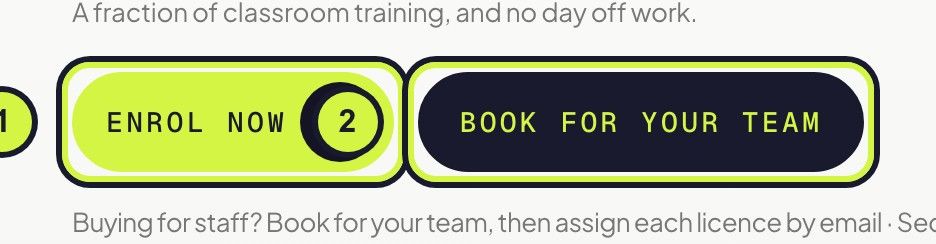
- Enrol now is for you. Press Book for your team to buy for other people.
- Choose how many people and check out by card or PayPal.
The licences then wait for you in My Licences on your dashboard. Each licence is one person on one course. See Licences.
How do I give a licence to a member of staff?
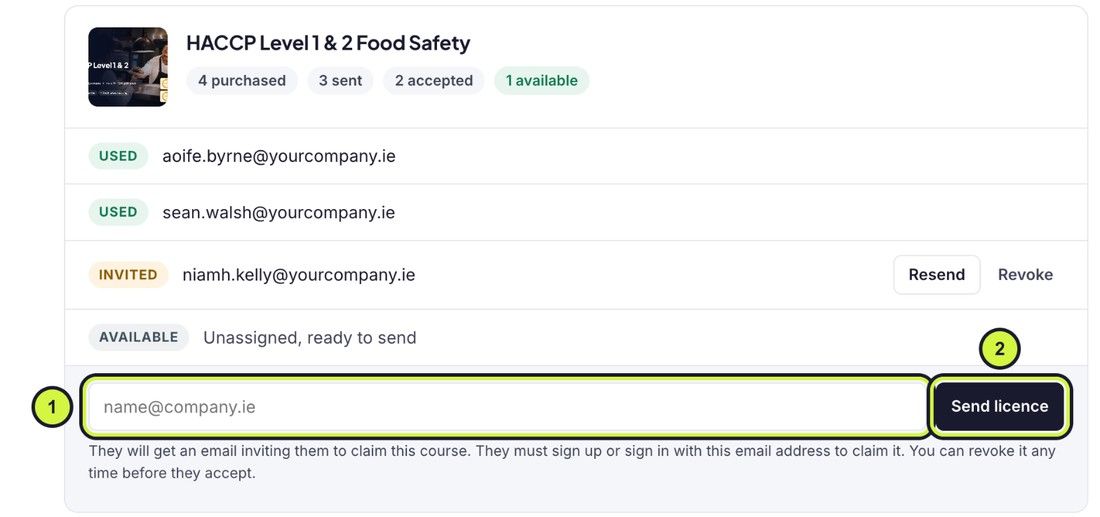
- Open My Licences on your dashboard.
- Under the course, type the person’s email address and press Send licence.
They get an email inviting them to claim the course, and get their own account, progress and certificate. They must sign up or sign in with that email address to claim it.
What do USED, INVITED and AVAILABLE mean?
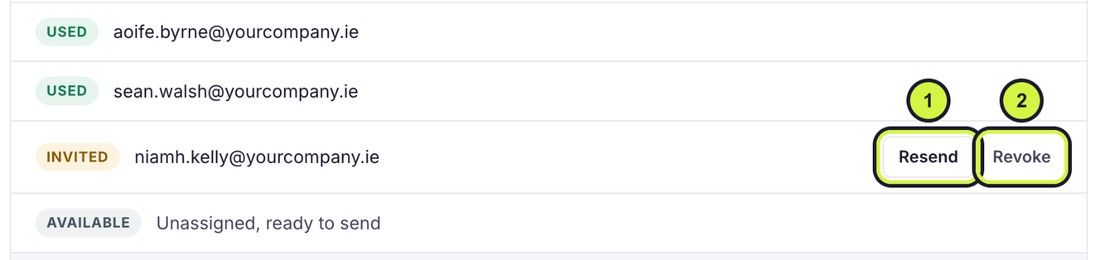
- USED: the person has claimed the course.
- INVITED: sent, but not claimed yet. Press Resend to send the email again.
- AVAILABLE: not sent to anyone yet.
Can I move a licence to someone else?
- Yes, while it shows INVITED: press Revoke beside the person.
- The licence goes back to AVAILABLE.
- Send it to the new person in the usual way.
Once a person has claimed a course (USED), it stays with them and cannot be moved, because their training record has to be kept.
Can I take one of the licences myself?
Yes. Send one to your own email address and claim it like anyone else. It then counts as used.
Group manager accounts
What is a group manager account?
A group manager account lets you add your staff, enrol them on courses and see their progress and certificates in one place. See Group manager accounts.
Adding learners to your group
Currently being updated. Check back soon!
Enrolling learners on a course
Currently being updated. Check back soon!
Tracking progress and certificates
Currently being updated. Check back soon!
Removing a learner
Currently being updated. Check back soon!
Downloading reports
Currently being updated. Check back soon!
Mistakes, refunds and transfers
I bought the wrong course
Email info@interic.ie with your order details, the email on your account and the course. We give a full refund within 30 days of purchase as long as you have not attempted the exam and no certificate has been issued. Then buy the right course.
The full rules are in our Refund Policy.
I accidentally enrolled myself
If you meant to buy for a member of staff but bought the course for yourself, or used one of your licences on yourself, email info@interic.ie. Within 30 days of purchase, and as long as the exam has not been attempted and no certificate issued, we refund it. Then buy or send a licence for the right person.
A course you have claimed stays on your account and cannot be moved to someone else.
Can I transfer a course or an unused licence?
- A licence you have sent but nobody has claimed: yes, revoke it and send it to someone else (see moving a licence).
- A licence nobody has been sent: send it to whoever you like.
- A course someone has claimed or started: no. It stays with that person, because their training record has to be kept.
Unused licences can be refunded within 30 days of purchase.
I was charged twice
If you are charged twice or buy the same course twice by mistake, email info@interic.ie. We refund the duplicate in full as long as it has not been used.
How do I ask for a refund?
Email info@interic.ie with your order details, the email on your account and the course. You do not need to give a reason within the 30 days. Refunds go back to the card or PayPal account you paid with.
See our Refund Policy for the full rules, including licences.
Where are my receipts?
In My account, under Payments.
No answers match that. Try another word, or email info@interic.ie.
Can’t find what you need?
Send us a message. We answer emails Monday to Friday, 9:30am to 5pm, except bank holidays.